
Counterfeit plugs: how to spot them and why they're dangerous
Home » Electricity » Home Electrical Safety » Cables and Extension Cords » Electrical Diagnosis and Troubleshooting » Electrical Safety for People and Habits » Electrical Panels and Protections in the Home » Sockets and Power Strips »
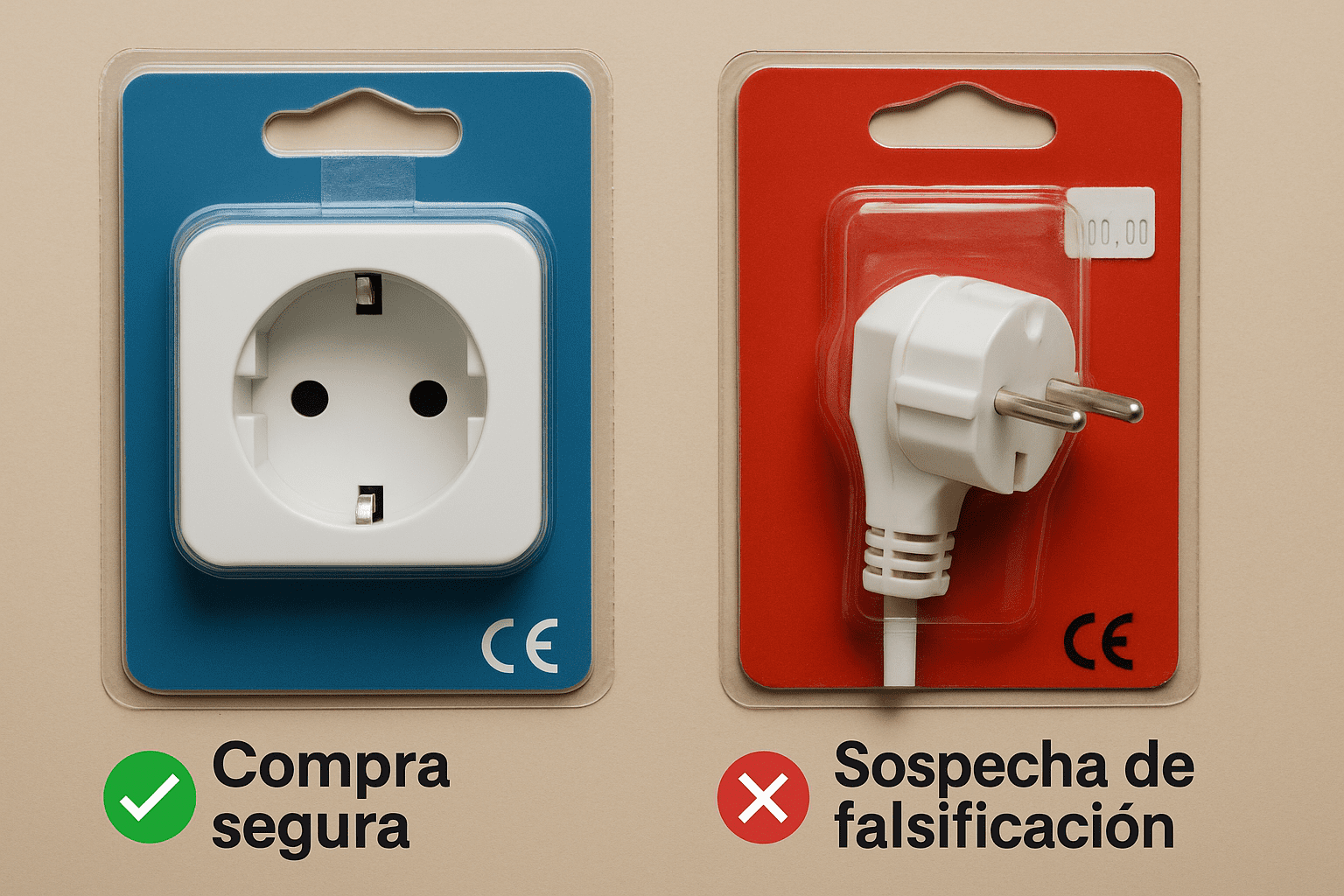
Quick signs of counterfeiting: fake logos, "too good to be true" price, and technical labeling
Packaging and markings: typography, errors and QR/batch
Counterfeit plugs are often betrayed by their packaging. Look for signs such as irregular fonts, spelling errors, blurry or low-resolution logos, and generic manuals that don't name the actual manufacturer. Be suspicious if the QR code doesn't open the official website or leads to pages without technical specifications; a missing or duplicate batch/serial number is also a red flag. Compare the exact model and its finish with the manufacturer's official image: differences in color, texture, and text placement often reveal counterfeits. A price that seems "too good to be true" and sellers without an invoice or warranty are key risk indicators for safe purchases . Also, avoid multi-standard accessories that "accept everything" because they facilitate incorrect connections : Universal "multi-standard" plugs: why you should avoid them at home.
Standard and certification visible (SEC/CE) on the technical label and on the plug body
On a genuine product, the technical label and the plug body itself display the applicable standard and certification (e.g., SEC/CE , depending on the country; see local regulations). Check that the markings are embossed or laser-etched clearly , and include the model, rated voltage/current, and earthing symbol where applicable. Counterfeit products often use similar or faded printed logos and omit critical information (rated current, protection rating, batch number). If the marking is present but inconsistent with the official data sheet or changes location/material between units, suspect an uncertified plug.
Physical inspection without opening: thin terminal, fragile plastic and soft screws
Casing: burrs, fragility and abnormal discoloration
Examine the plug body against the light. A reliable product has a uniform finish, free of burrs or sharp edges. The texture should be consistent (matte or glossy depending on the model), without stains, uneven discoloration , or translucent areas that indicate fragile or undersized plastic. Press gently: if the plastic creaks, gives excessively, or springs back with a rubbery "memory," be wary. Check the safety shutters: they should align and close automatically; a stiff, misaligned, or stuck-open closure indicates poor manufacturing. Verify that the pictograms and text on the technical label are embedded (engraved/embossed or laser-etched) and not just printed, which rubs off. If the cover or trim does not fit the body and leaves visible gaps, avoid using it.
Terminals and screws: thickness, fastening and stability of the plug
Without opening the product, you can identify key signs:
- Peg stability: Insert and remove a standard plug; the insertion should be firm and even, without any wobbling or jamming. If there is slack Unequal resistance between sides is a symptom of thin terminals or poorly centered.
- Retention and contact tension: When pulled gently, the pin should not come out almost effortlessly nor get stuck; both ends should offer similar friction.
- Flatness and alignment: Check if the plug goes in straight. A visible tilt indicates misaligned internal contacts.
- Visible screws (when present): Screw heads with a clean footprint and consistent material; soft screws, screws with burrs or with a "painted" coating that peels off are a bad sign.
- Grounding (if applicable): verify that the ground contact has solid support and do not flex excessively. Weak contact can fail with use and contribute to false contact and the heating.
Differentiating between counterfeiting, overloading, faulty contact, and poor installation (practical comparison)
Typical symptoms, causes and immediate action in each case
- Counterfeit (uncertified intake, dubious logo):
Symptoms: blurry or off-center markings, inconsistent fonts, fragile plastic with burrs, a peg that goes in "too softly" or wobbles.
Root cause: Poor materials and quality control; incomplete or copied technical label.
What to do: Stop using, document (photos of body and packaging), replace with a certified plug and keep the receipt for the new one. - Overload (use above power/time):
Symptoms: Progressive heating, discoloration around the shot, plastic smell, shooting when using multiple devices at the same time.
Root cause: sum of simultaneous consumption and continuous use without ventilation.
What to do: separate loads, ventilate, and follow practical limits for power strips and extension cords. - Loose connection (looseness in the socket or accessory):
Symptoms: Sparks when plugging in, buzzing, unstable plug, scorched areas, localized heat even when the load is not high.
Root cause: Poor terminal pressure, worn contact points, or adapters/terminal blocks with poor contacts.
What to do: Remove the accessory, let it cool, and replace the point if there is play or damage to the plate. - Poor installation (loose connections or poorly stripped conductor):
Symptoms: erratic behavior from new, overheated smell with moderate loads, arc marks on the inside (when checked by a technician).
Root cause: loose terminals or defective terminals inside the box.
What to do: Do not use until professional inspection; replace the mechanism and check tightness/insulation.
Practical rule: If you notice heat, odor, or discoloration , stop using the appliance and investigate the cause: if the problem only occurs with heavy loads → likely overload ; if it occurs with a specific plug or when touching the socket → likely loose connection ; if the product shows poor markings and flimsy plastic → suspect counterfeit ; if everything fails despite new accessories → check the installation.
Risk of overheating and arcing: what can happen and how to prevent it
Overheating occurs when the contacts offer more resistance than expected (poor material, thin terminals, or looseness). This excess resistance is transformed into heat: softens the plastic, deforms the geometry of the plug and The contact worsens even further.creating a vicious cycle that can end in electric arc (Sparking between surfaces), blackening, and permanent damage. In counterfeit plugs, this occurs sooner and with lower loads because the quality of the metal and plastic is usually inferior, and the markings do not correspond to the actual nominal current and manufacturing controls are scarce.
Warning signs: warm to the touch, smell of plastic, discoloration or brown marks around the socket, buzzing sounds, or sparks when plugging it in. If you detect any of these signs, Stop using the period and review safe performance criteria.
Continuous use, ventilation and avoid adapter "cascades"
- Avoid continuous use at its limit.Do not operate a socket or power strip near its maximum capacity; leave thermal margin and distributes simultaneous consumption across several points. To remember limits and typical errors, see: Overloading power strips and extension cords: safe limits and common mistakes.
- Ventilation and locationDo not cover the power strip with textiles or enclose it in furniture; place it in ventilated surface and dry.
- Without “waterfalls”Do not stack adapters on top of power strips or power strips on top of each other; each extra connection adds resistance and increases the likelihood of failure. false contact.
- Tactile and visual checkAfter a few minutes of continuous use, touch the area (carefully); if it is very hot, disconnect and distributes loads. Observe the coloration of the plastic and the stability of the plug.
- Timely replacement: in case of looseness, odor or discoloration, withdraw the accessory and replace it with a certified one of better quality.
Secure shopping: where, how and what to check before paying
Physical/online store, invoice, returns policy and authorized seller
Buy in authorized retailers (Physical or online store with a good reputation, visible tax information, and after-sales service). Request bill and check the return policyA reliable channel allows for the exchange or return of a suspect product without hassle. Contrast this with... exact model Check the official manufacturer's website for the plug and verify that the photos, markings, and technical label Ensure they match (nominal voltage/current, earth symbol, code, or batch number). Avoid offers without a technical data sheet or with price “too good”.
Before paying, look at the standard/certification markings (e.g., SEC/CE; see local regulations) on the plug body and on the packaging; they must be on relief or sharp laserNot just faded printed materials. Be wary of sellers who don't provide an invoice or claim "clearance stock without box." To reduce the risk of counterfeit accessories, avoid... multistandard (promote false contact) and the adapters 2→3 legs (They do not add soil).
Safe home testing: pin fit, looseness, and burnt smell
- Basic preparation. Work with dry hands, good lighting, and no high loads connected. If the area has already shown signs of risk (heat or odor), do not continue until it has been checked.
- Pin adjustment. Insert and remove a standard plug. It should go in straight, with even friction on both sides and without any wobbling. If it's loose or comes out with almost no effort, there's slack and risk of false contact.
- Test with a light load. Plug in a lamp or small charger and gently wiggle the plug. If there are flickers, clicking sounds, or buzzing noises, remove the accessory: the connection is poor.
- Tactile and olfactory check. After 5–10 minutes, gently touch around your forehead. If you notice heat o smell of plasticStop use and consider replacing the spot or accessory. Action guide.
- Visual inspection. Look for discoloration, cracks, burrs, bent screws, or a cracked plate. Any of these signs warrants immediate replacement of the fitting and inspection of the area.
When to use a socket tester and what it can tell you
El socket tester It is used to check the basic wiring of the point (polarity, loose neutral, absent land). Authenticity not valid of the plug, but it helps to rule out installation errors that aggravate the risk.
How to use it: Insert it into the socket, compare the light pattern with the legend on the tester itself, and act accordingly. If it indicates "ground missing" or "reversed polarity," do not use that point until it is corrected. Complete guide to use and interpretation.
What to do if you suspect a counterfeit plug (decision flow)
Disconnect, do not reuse, replace with a certified one, keep packaging and report
- Unplug it and don't use it again. If you notice suspicious markings, fragile plastic, unusual looseness, or a price that seems too good to be true, stop using it immediately.
- Document the evidence. Take pictures of plug body, technical label, packaging (including code/QR and batch) and of dealer (screenshots if it was online).
- Remove and replace with a certified product. Replace the mechanism with a plug with standard marking/certification legible (e.g., SEC/CE, depending on the country; see local regulations). Retains the bill and the packaging of the new one.
- Don't try to "repair" or reinforce. A counterfeit product may have thin terminals and materials that they overheat with moderate loads; manipulating it does not correct the original problem.
- Report. inform the seller and Manufacturer original (if the product copies your brand). If applicable, notify the consumer/safety authority from your country and to the marketplace where you purchased it.
- Check the surroundings. If the suspect outlet powered power strips or adapters, inspect those accessories for slack o discolorationReplace any element with symbols of heating u smell of plastic.
When the problem is not counterfeiting: saturated points and the need for a dedicated circuit
When a wall outlet is overloaded with too many devices or used for hours with cascaded power strips , the symptoms (heat, discoloration, plastic smell, short circuits) are often mistaken for a "poor quality" plug. In reality, these are overloaded outlets : the combined load and continuous use raise the temperature and accelerate wear and tear. The solution isn't to add another adapter, but rather to distribute the load among different outlets and, if usage is frequent or high-consumption, to install a dedicated circuit (check local regulations) to improve electrical safety.
Indications for expanding outlets and distributing loads
- Persistent warming from the plug or power strip despite moderate loads and good ventilation.
- Simultaneous use of several medium/high-end equipment (home office, TV + console + sound, kitchen with small appliances).
- Habitual dependence on triple adapters o linked strips for the day to day.
- Shots by connecting two or more devices at the same time at the same point.
- Inability to place the power strip in ventilated surface (it always ends up behind furniture or next to textiles).
Plan and arrange circuits on the board.
Reminder of the scope of dashboard protections.
Common examples: wall sockets, adapters, and power strips with USB ports
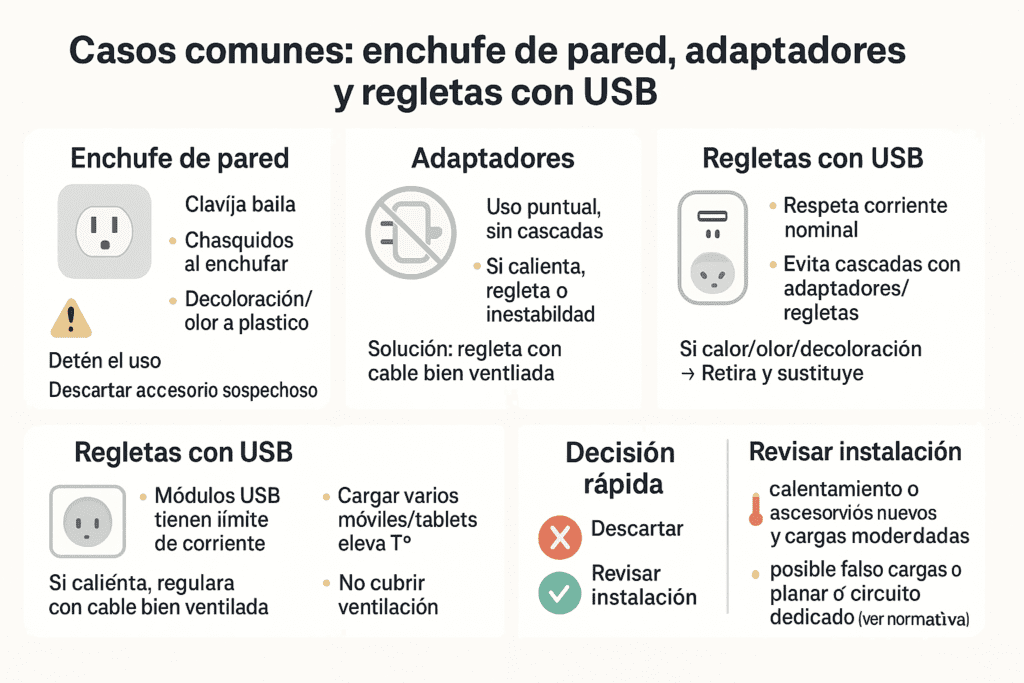
Specific signs and decision: when to discard and when to review installation
Wall socket. If the plug "wobbles," there are clicking sounds when plugging it in, or you notice discoloration/a plastic smell, stop using it. Immediately discard any suspicious accessories and review the point if heat persists under moderate loads or if the plate is cracked.
Adapters. Use them only occasionally and without "cascading" connections. If the adapter gets hot, becomes loose, or causes the plug to become unstable, discard itThe solution is to move on to power strip with cable well ventilated.
Power strips with USB ports. USB modules have current limitCharging multiple phones/tablets at the same time can raise the temperature: distribute the load and alternate ports. Good practices here.
Timers and smart plugs. Respect the nominal current and avoid cascading them with adapters/power strips. If they get hot, smell, or show discoloration, remove and replace. Safe usage guide.
Quick decision.
- Discard: accessory with looseness, heat, discoloration or odor.
- Check installationYes, even with new accessories and moderate loads, overheating or misfires may occur. false internal contact or saturated point that requires redistributing loads or planning dedicated circuit (see local regulations).
Brief FAQs on Authenticity and Electrical Safety
How to recognize a fake logo or manipulated technical label?
Look for clear, embossed or laser-etched markings , not prints that rub off. Check for consistency in model , rated voltage/current , ground symbol , and batch/QR code . If there are irregular fonts, spelling errors, or the QR code leads to a website without a technical data sheet, suspect a counterfeit.
Does the absence of certification always imply danger?
A plug without visible certification or with a questionable seal does not guarantee compliance with standards (see local regulations) and increases the risk of overheating, poor contact, or electric shock . If you cannot verify the certification on the plug/packaging and on the manufacturer's website, do not use it and replace it.
What should I keep to make a claim or report (invoice, photos, batch number)?
Keep the receipt/invoice , packaging with the lot/QR code , and photos of the plug body, technical label, and point of sale (screenshots if purchased online). This evidence supports the return and the report to the seller, manufacturer, and consumer/safety authorities.
What are the clearest signs to recognize a counterfeit plug?
Poor quality packaging, blurry logos , incomplete labels , fragile plastic with burrs, and a thin terminal that makes the plug wobble. An excessively low price and sellers without invoices are red flags for an unsafe purchase.
How do I verify that the certification (e.g., CE/SEC, depending on the country) is authentic?
Compare the exact model and its markings on the manufacturer's official website. Check that the seal is embossed/laser-engraved and that the documentation matches (model, batch, face values). If the seal looks "copied" or there is no official data sheet, avoid it (see local regulations).
What differences betray a fake CE marking?
Inaccurate logo proportions, irregular spacing, faded printing, and missing documentation (declaration of conformity, representative details). A valid CE marking must include model/batch identification and consistent specifications.
What documentation and information should a genuine plug come with?
Model , code/batch or QR code , rated voltage and current , earth symbol (if applicable), manufacturer/representative and certification . These must match between the body , label and packaging , and with the manufacturer's data sheet.
What are the real risks of using counterfeit plugs?
Low-quality materials and poor contacts can cause overheating , arcing , and damage to equipment or fire. These products often fail prematurely, even under moderate loads, due to their inferior terminals and plastic components.
Where to buy to minimize the risk of counterfeits?
Prioritize authorized retailers and stores with clear after-sales service and return policies . Be wary of offers without technical specifications, "stock without boxes," or sellers without tax information. Request an invoice and verify that the product matches the official specifications.
Can a “socket tester” detect if a plug is counterfeit?
No. The socket tester checks polarity , neutral, and ground , but it does not validate authenticity . Use it to rule out installation errors at the wall outlet.
How can I tell the difference between a counterfeit plug and an original one that's damaged by overloading or a loose connection?
The counterfeit gives it away marked poor y flimsy materials from new. The damaged original shows discoloration/odor after use or slack due to wear and tear. If there is heat or smell of plasticIt works like this: The plug gets hot or smells burnt: what to check and how to act.
If you detect slack or broken plate in the socket, replace the spot.
What steps should I take if I suspect I bought a counterfeit plug?
- Do not use it; 2) Documenta body, label and packaging; 3) Replaces by a certified one; 4) Reports Contact the seller, manufacturer, and, if applicable, the relevant authorities/marketplace. If you also relied on adapters/power strips, check overload and secure distribution.
Is it safe to buy plugs and adapters on marketplaces?
Only buy from official stores or verified sellers with a receipt and complete technical specifications. Avoid "miracle" or "energy-saving" gadgets without documentation. To reduce additional risks, avoid multi-standard and 2-to-3-prong devices.

Jude Jacques is a poet, writer, and playwright with a strong background in business management. He teaches electricity at the Don Bosco Salesian Technical School, where he has over 15 years of experience training future electrical professionals. His work combines the humanistic perspective of the arts with the rigor of technical education, bringing a unique perspective both in the classroom and in his creative projects.